macOS Tahoe 26 brings a major redesign with Liquid Glass, introduces the Phone app on Mac, enhances Spotlight with actions, and expands Apple Intelligence with translation, shortcuts, and image creation tools.
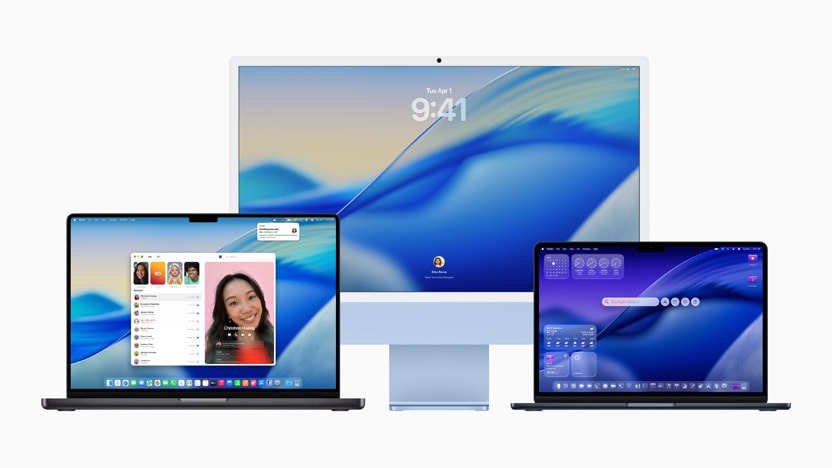
Apple has unveiled macOS Tahoe 26, the next major update for Mac, introducing a refined software design, enhanced continuity features, and deeper integration of Apple Intelligence. The update brings visual and functional upgrades aimed at boosting productivity, personalization, and seamless interaction across Apple devices.
One of the most noticeable changes is the refreshed design language powered by Liquid Glass — a translucent new material that adapts to its surroundings and brings depth and clarity across system UI elements. The Dock, menu bar, sidebars, and app toolbars have been redesigned to shift focus toward user content, while also allowing greater personalization through new icon themes, color tints, folder customization, and clear aesthetic options. The transparent menu bar enhances screen real estate, giving the Mac a more immersive experience.
Continuity sees a significant upgrade with the arrival of the Phone app on Mac. Users can now manage calls directly from their desktops, including access to Recents, Favorites, and Voicemails, as well as iPhone-exclusive features like Call Screening and Hold Assist. Live Activities from iPhone also appear in the Mac’s menu bar, keeping users updated with real-time info such as ride updates, sports scores, or flights. Clicking on a Live Activity launches iPhone Mirroring for more detail.
Spotlight gets its biggest update yet. The improved search tool now offers intelligently ranked results across files, apps, messages, and more, with new filtering options and quick browse views. Users can perform hundreds of actions directly from Spotlight, like sending an email, launching a podcast, or running a shortcut. Developers can also integrate their app functions into Spotlight using App Intents API, making it more powerful and flexible.
macOS Tahoe 26 also expands Apple Intelligence capabilities, enabling more natural and private interactions. Live Translation can translate messages and calls in real time across Messages, FaceTime, and Phone, using on-device Apple models to maintain privacy. Shortcuts are enhanced with intelligent actions that work with Apple’s AI models or Private Cloud Compute. Users can automate tasks, summarize content, generate images, or even tap into ChatGPT when broader knowledge is needed.
Also Read: iOS 26 Announced: Full List of Compatible iPhones and Key Features Revealed
Image Playground and Genmoji also get upgrades, allowing users to generate and personalize images or emoji-based characters with more control over appearance and expressions. Meanwhile, Reminders can now intelligently scan content like emails or notes to suggest action items and auto-categorize them for easier task management.
The new Apple Games app debuts with macOS Tahoe, offering a centralized space for gaming. It allows users to organize, discover, and launch games easily. The new Game Overlay lets players chat, adjust settings, or invite friends without leaving the game. With support for Metal 4 and features like MetalFX Frame Interpolation and Denoising, the update is set to improve graphics performance for AAA titles like Crimson Desert, InZOI, Cyberpunk 2077, and more.
Safari has also received design updates, including a floating tab layout and improved sidebar navigation. It now delivers up to 50% faster page loading compared to Chrome and offers extended battery life while streaming.
The Messages app adds Backgrounds, Polls, improved contact management, and smarter search. Journal is now available on Mac, offering users a way to log memories and thoughts across devices. The Photos app has been redesigned with Liquid Glass visuals and better organization features like pinned collections, customizable tiles, and quicker filtering.
Other notable improvements include a redesigned FaceTime UI with floating controls, markdown support in Notes, and advanced Accessibility tools like Magnifier, Accessibility Reader, and Braille Access. Passwords adds version tracking to help users monitor and manage account changes.
Availability
The developer beta of macOS Tahoe 26 is available now through the Apple Developer Program for the following devices:
- MacBook Air with Apple Silicon (2020 and later)
- MacBook Pro with Apple Silicon (2020 and later)
- MacBook Pro (16‑inch, 2019)
- MacBook Pro (13‑inch, 2020, Four Thunderbolt 3 ports)
- iMac (2020 and later)
- Mac mini (2020 and later)
- Mac Studio (2022 and later)
- Mac Pro (2019 and later)
A public beta will be released next month via the Apple Beta Software Program, with the full rollout scheduled for this fall as a free software update.